Traductor. Translator.

jueves, 30 de octubre de 2014

Factura en Excel

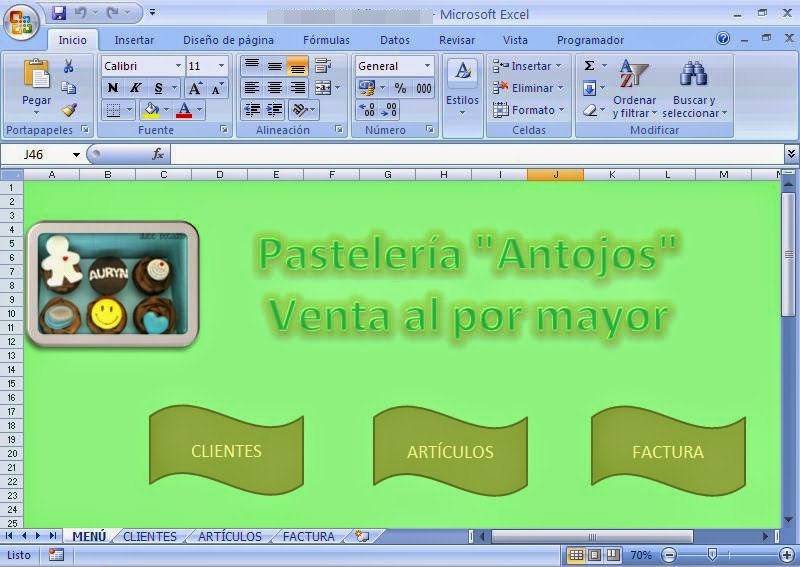
Durante este mes hemos estado realizando cierta serie de prácticas en Excel. Aquí os dejo la más costosa de hacer hasta la fecha.

Hoja 1:

Un menú de inicio con unos botones que nos permitirán navegar por el resto del libro.


Hoja 2:

Una tabla con un listado de la información de los clientes.


Hoja 3:

Un listado con el código de cada artículo, los productos a vender, el precio unitario, el precio de diez unidades y el precio por cien unidades.


Hoja 4:

La factura de la compra. Al introducir el código del producto y el número de unidades se autocompletará, al igual que con el código del cliente. 
Además, hemos creado dos macros:
a) Macro borrar: es un botón que al pulsarlo automáticamente se elimina toda la información de la tabla sin necesidad de borrarla manualmente.
b) Macro imprimir: al pulsar este botón aparecerá la vista previa de la factura momentos antes de ser imprimida. A continuación, solo habrá que pinchar al botón con el dibujo de la impresora que aparece en pantalla y la factura pasará a papel sin necesidad de modificar nada.


miércoles, 8 de octubre de 2014

Sociedades de la información y el conocimiento

Aquí os dejo el primer trabajo que hemos hecho en el curso sobre las sociedades de la información y el conocimiento.
Here I upload the firts work that we've done about the information and knowledge society.

http://www.slideshare.net/LidiaJEIT/1tic-navarrodel-castillolidiasociedad-de-la-informacin-y-el-conocimiento-1

lunes, 6 de octubre de 2014

El Internet de las cosas

Básicamente, se trata de que todas las cosas del mundo estén conectadas a Internet. Hoy en día tenemos smartphones, tablet, ordenadores portátiles, dispositivos multimedia en el salón, e incluso las propias televisiones que se conectan a Internet. A esto habría que añadir las videoconsolas, e incluso los coches. Sin embargo, eso no es nada en realidad si pensamos en la gran cantidad de cosas que hay en el mundo. No solo los dispositivos electrónicos pueden conectarse a Internet.
El Internet de las cosas va mucho más allá. Algunos ejemplos de cosas conectadas a la red que podrían considerarse como parte de ese Internet de las cosas serían los electrodomésticos que están conectados. Ya existen frigoríficos, hornos y lavadoras que pueden ser controladas desde un smartphone gracias a la conexión a Internet con la que cuentan. Ese es solo el primer paso de lo que está por llegar. Tanto a nivel doméstico como a nivel profesional, el Internet de las cosas podría cambiar el mundo tal y como lo conocemos hoy. Pensemos solo en algunas de las aplicaciones que podrían llegar a tener lugar. Un agricultor debe conocer en todo momento las condiciones del campo en el que está cultivando. Su trabajo consistiría en comprobar regularmente la temperatura y humedad del campo y registrar estos datos en un ordenador. Pero supongamos que todos esos datos fueran monitorizados de manera automática y registrado en un servicio online, de manera que el agricultor tuviera en todo el momento el conocimiento de cómo está el campo de cultivo e incluso pudiera conocer cómo está en tiempo real. Y todavía hay más, con sensores lo suficientemente baratos, podría llegar a monitorizar absolutamente todas las plantas que están cultivando, conociendo cómo crecen y si están teniendo problemas algunas de ellas.

Sus aplicaciones domésticas podrían ser igual de importantes. Por ejemplo, podríamos disponer de sensores y controladores en diversos elementos de una casa. Seguro que nos ha ocurrido irnos de viaje y no estar seguros de si hemos quitado el fuego de la cocina, o si las persianas, ventanas o luces se han quedado tal y como queríamos. Todo sería tan sencillo como acceder al servicio con el que controlamos nuestra casa, y no solo comprobar que todo está de manera correcta, sino incluso modificar el estado de los mismos. O si por el contrario, vamos a volver en pocas horas a casa, podemos incluso programar cuándo queremos que comience a prepararse la comida. Cosas como regular la temperatura del hogar cuando estemos nosotros allí o encender las luces de manera automática, podrían ser hechos cotidianos de la vida. Es el Internet de las cosas, las cosas que nos rodean, que pasarían a estar permanentemente conectadas.

viernes, 19 de septiembre de 2014

¡HOLA DE NUEVO! / HELLO AGAIN!

¡Hola a todos!

Ya he vuelto de vacaciones y toca ponerse las pilas otra vez para sacar bachillerato adelante. Al igual que el curso pasado, iré subiendo aquí todos los trabajos que vaya realizando. Espero que os sean igual de útiles que creo que me serán a mí.
¡Nos leemos!


Hello everybody!

I've come back from holidays and I have to study hard again to pass. At same last year, I'll uploading here all the works that I'll doing. I hope you find them as useful as I think they'll be for me.

jueves, 12 de junio de 2014

How to dissapear online

We are going to know how to dissapear following the next steps:


  • Step one:
 Desactivate primary accounts.


  • Step two:
Search for yourself on the net.


  • Step three:
Falsify undeletable accounts.


  • Step four:
Unsubscribe from mailing list.


  • Step five:
Deleate search engine results.

  • Step six:
Contact webmasters.

  • Step seven:
Consider data clearinghouses.

  • Step eight:
Check in with your phone company.

  • Step nine:
Delete your email.

lunes, 19 de mayo de 2014

Video pad

We're going to finish our term doing a video about news using a program of free software called Video pad.

What Is VideoPad?


VideoPad is editing software that helps in the enhancement of videos to give them a professional touch. It has many tools that can help you transform your homemade videos and share them with friends and family through various media. Here are some of the features of this software:

Effects

The effects in this software allow you to select from an array of fading transitions, preview them as real time applications and also set the time of the chosen effect. Therefore, you get to choose the manner in which the effects take place, control the amount of time for the effects, and preview them like they were final products.

Optimization

With VideoPad, you can easily add digital images and pictures, while also adjusting the brightness and contrast for your video. You can create effects similar to those found in old images and videos by applying the black and white effects. You can also play around with the sepia and negative toned effects. VideoPad allows you to input text or captions onto the video as well. There is also a set of great audio tools to experiment with.

Audio Tools

You can import set musical tracks or be more creative and come up with your own by combining two or more tracks. This tool also allows you to select or make your own soundtrack for your video. You can even input your own words into a narration on the video or if you have an existing one, you can simply import that to be added to the final product.

jueves, 15 de mayo de 2014

Social networks

My partner and me did a presentation about what is a Social network, how you can use it, types and security.
Here I put the link because we did it in Prezi, but, if you have problems to see it, also I write here the information.
I hope you like it!

http://prezi.com/k_zkfeul2zj5/social-networks/


A. Definition:

Alternatively referred to as a virtual community or profile site, a social network is a web site on the Internet that brings people together in a central location to talk, share ideas, share interests, make new friends, etc.

B. Before & now:

This type of collaboration and sharing of data is often referred to as social media. Unlike traditional media that is often created by no more than 10 people, social media sites contain content that has been created by hundreds or even millions of different people. Below is a small list of some of the biggest social networks used today.

C. Six Major Social Network Categories:

1.Social connections
2.Multimedia sharing
3.Professional
4.Informational
5.Educational
6.Hobbies

1.Social connections

Keeping in touch with friends and family members is one of the greatest benefits of social networking. Here is a list of the most widely-used websites for building social connections online.

• Facebook: Arguably the most popular social media utility, Facebook provides a way for users to build connections and share information with people and organizations they choose to interact with online.


• Twitter: Share your thoughts and keep up with others via this real-time information network.

• Google +: This relatively new entrant to the social connection marketplace is designed to allow users to build circles of contacts that they are able to interact with and that is integrated with other Google products.


• MySpace: Though it initially began as a general social media site, MySpace has evolved to focus on social entertainment, providing a venue for social connections related to movies, music games and more.


• Tuenti: is a Spanish social network that is similar to Facebook.


2.Multimedia sharing

Social networking makes it easy to share video and photography content online. Here are some of the most popular sites for multimedia sharing.

YouTube
Flickr
Picasa
Instagram
Vine

3. Professional & 4. Informational

3.Profesional
Professional social networks are designed to provide opportunities for career-related growth. Some of these types of networks provide a general forum for professionals to connect, while others are focused on specific occupations or interests. A few examples of professional social networks are listed below.
 LinkedIn
 Nurse Connect

4.Informational
Informational communities are made up of people seeking answers to everyday problems. For example, when you are thinking about starting a home improvement project or want to learn how to go green at home, you may perform a web search and discover countless blogs, websites, and forums filled with people who are looking for the same kind of information. A few examples include:
Super Green Me: HGTV 
DiscussionForums: Do-It-Yourself Community.

5.Educational &  6.Hobbies

5.Educational
Educational networks are where many students go in order to collaborate with other students on academic projects, to conduct research for school, or to interact with professors and teachers via blogs and classroom forums. Educational social networks are becoming extremely popular within the educational system today. Some examples of such educational social networks are listed below.
The Student Room, The Math Forum, ePALS School Blog, Classroom 2.0, Academia.edu

6.Hobbies
One of the most popular reasons many people use the Internet is to conduct research on their favorite projects or topics of interest related to personal hobbies. When people find a website based on their favorite hobby, they discover a whole community of people from around the world who share the same passion for those interests. This is what lies at the heart of what makes social networks work, and this is why social networks that are focused on hobbies are some of the most popular. A few examples of hobby-focused social networking sites include: Oh My Bloom, My Place at Scrapbook.com,
 Sport Shouting 

D. Build Connections with Caution

These are just a few examples of the many opportunities to engage in dialog via social media websites. The fact that there are so many ways to connect with like-minded individuals online can be very exciting and beneficial, but it's essential to proceed with caution. Keep in mind that not everyone who shows up on a social media website is who he or she claims to be. Exercise caution and closely guard your personal information any time you engage in social networking activities regardless of what kind of social utility you are using.